Quake II.
The second Quake in a separate browser project. Check the host for current modes and files.
- Genre
- Shooter
- Before you open
- Check project
- Typical session
- 5 to 30 minutes
- Difficulty
- medium to high
- Devices
- desktop with keyboard and mouse
- Hosted by
- Pieter's ports
Quick answers about Quake II
- Can I play Quake II in a browser?
- Yes — but Quake II needs a data folder from a copy of the game you own before it will start.
- Do I need to download anything?
- No download, but yes preparation: a folder of game data you already own.
- Does it work on a phone?
- Not really — this one wants a keyboard and a mouse.
- How long does a session last?
- 5 to 30 minutes. Difficulty: medium to high.
What is Quake II?
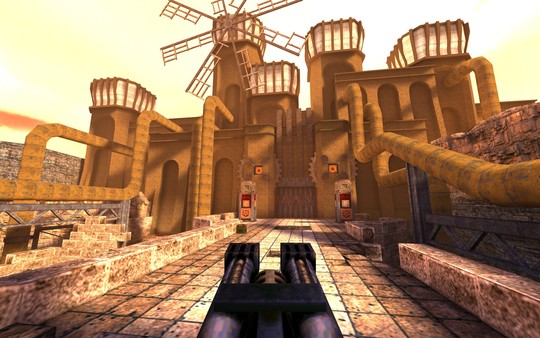
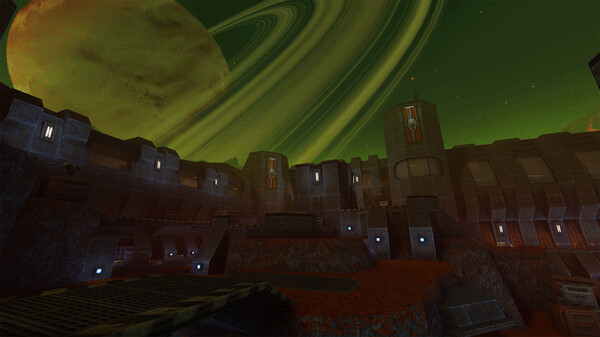
This is the Quake II entry: a shooter game from the shared list collection. id Tech 2 with the full renderer — lightmapping, water and 3D monsters intact. A browser port of a classic engine — read the project notes first — the details are below, along with the controls, the setup steps and the fixes for the three things that usually go wrong.
Hosted by Pieter's ports, the project's own page — their notes are more current than this listing, and nothing is mirrored here.
Quake II runs on the original game engine rather than a remake, which is why the requirement is stricter than the rest of this index: the engine needs a data folder, and the data comes from a copy of the game you own. If you do not own it, the shareware deployment — where one exists — is as far as this entry goes, and that is still enough to test whether the build runs on your machine.
id Tech 2 renders its light into the map rather than calculating it per frame, which is why Quake II looks the way it does and also why it needs a little longer on the first load: the engine is streaming and pre-baked data, not just code. Once a level is loaded it runs smoothly, and the movement still follows the same keyboard-forward strafe rules as Quake.
The single biggest difference from the original Quake is the enemy design. Quake II put melee-range monsters and hitscan enemies in levels built for ranged weapons, so the usual tactic is to clear a doorway from safety rather than to brawl in the open — which is also why it plays well on a trackpad.
Shooter entries split cleanly into two camps: the community ports of classic PC shooters, which need a keyboard and mouse and can require your own game files, and the browser-native arena shooters, which load instantly and play with mouse look. Closest to Quake II by setup and browser requirements: BuildNow GG, Hazmob FPS: Online Shooter, Quake — each has its own page with the same three answers.
What do you need before playing Quake II?
A browser port of a classic engine — read the project notes first. These are community ports that run the original game engine compiled to WebAssembly.
How to set it up
- Open Quake II on Pieter's ports in a desktop browser.
- If it asks for game data, point it at a folder from a copy of the game you own.
- Click once on the game area so it captures your keyboard and mouse — browsers do not send key events to an unfocused page.
- Play Quake II. Progress, settings and saves are stored in this browser only, so clearing site data resets them.
How do you play Quake II in a browser?
- Open the port, click to lock the mouse, and start a new game.
- Expect the first mission to load slower than the rest — the assets are streamed per level.
- If the ground is too dark, the original light settings need the project's brightness option.
Move before you aim. More shooter games ↗
What are the Quake II controls?
| Input | Action |
|---|---|
| Ctrl | Crouch |
| E | Use |
| W A S D | Move — keyboard-forward strafe |
This one expects a keyboard and mouse. Most browser ports will not send keyboard events until you click the game area once, and mouse-look will not start until the pointer locks.
How do you get better at Quake II?
- Quake II is the port that most often needs nothing but a browser and a click.
- Mouse sensitivity is unusually low by default; raise it before you blame the port.
- Save with F2 as often as the map allows — browser storage saves are local.
Why won't Quake II load?
| Symptom | What it means |
|---|---|
| The keyboard does nothing in Quake II | The page has focus, not the game. Click the canvas itself once — the surrounding text, banners and scroll area do not forward key events to the game. |
| Quake II shows a black screen after a few seconds | Usually shader compilation on the first visit of Quake II. Give it 20 seconds; the second load is always faster than the first. |
| Quake II stops at the data prompt | The wrong folder was selected. Choose the folder that directly contains the game assets, not its parent and not a file inside it. |
| Quake II still will not start | Open the link on another device or network. If it runs there, the problem is local to your browser or machine, not to the project hosting it. |
The full ordered list of fixes, including pointer lock, browser choice and site data, is in the browser game not loading guide.
Questions about Quake II
Do I need to download anything to play Quake II?+
No download, but yes preparation: Quake II runs on the original engine and needs a data folder from a copy of the game you own. The engine is the code; the assets are the game. A browser port of a classic engine — read the project notes first.
What does Quake II need before you open it?+
A browser port of a classic engine — read the project notes first. These are community ports that run the original game engine compiled to WebAssembly. Nothing is bundled or fetched on your behalf — the guide on ports that need your own files covers the details.
Can I play Quake II on a phone?+
Not comfortably. Quake II is a shooter entry and it wants a keyboard and a mouse — mouse look and two-handed movement are not something a touchscreen can replace. You can still open the link on a phone to see whether the project offers touch controls, but expect it to be unplayable rather than awkward.
Is Quake II the original game or a remake?+
id Tech 2 with the full renderer — lightmapping, water and 3D monsters intact. Pieter's ports hosts it, and that page is where you find out whether it is a port of, a remake of, or a completely separate browser game. This one runs on the original engine and needs a data folder from a copy you own.
Why is Quake II darker than Quake?+
id Tech 2 bakes the lighting into the level data instead of computing it every frame, so shadows are fixed and darkness is genuinely dark. It is faithful to the 1997 original, not a rendering bug in the port.