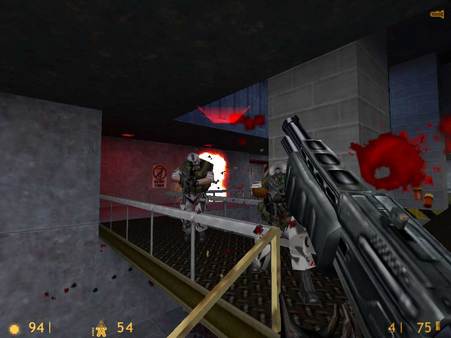
Half-Life Web.
A community browser launcher for Half-Life. Read its requirements before expecting the full campaign.
- Genre
- Shooter
- Before you open
- May need game files
- Typical session
- 5 to 30 minutes
- Difficulty
- medium to high
- Devices
- desktop with keyboard and mouse
- Hosted by
- pixelsuft.github.io
Quick answers about Half-Life Web
- Can I play Half-Life Web in a browser?
- Yes — but Half-Life Web needs a data folder from a copy of the game you own before it will start.
- Do I need to download anything?
- No download, but yes preparation: a folder of game data you already own.
- Does it work on a phone?
- Not really — this one wants a keyboard and a mouse.
- How long does a session last?
- 5 to 30 minutes. Difficulty: medium to high.
What is Half-Life Web?
Half-Life Web belongs to our shooter section and to the shared list collection. Half-Life running in the browser as a fan build, sometimes bundled, sometimes not. The page below covers what Half-Life Web actually is, what you need before you open it, the controls, and what to do when the browser refuses to cooperate.
Hosted by pixelsuft.github.io, the project's own page — their notes are more current than this listing, and nothing is mirrored here.
Half-Life Web runs on the original game engine rather than a remake, which is why the requirement is stricter than the rest of this index: the engine needs a data folder, and the data comes from a copy of the game you own. If you do not own it, the shareware deployment — where one exists — is as far as this entry goes, and that is still enough to test whether the build runs on your machine.
Half-Life came out in 1998 with scripting nobody had attempted at that scale, and that scripting is why the game still holds up. The set pieces work because the level tells the game what to do rather than the level designer scripting each moment.
Some deployments of this port ship with everything needed to play the opening chapters; others expect a Half-Life data folder from a copy you own. The entry above states which one you are looking at, and the guide on ports that need your own files covers what to do if a file prompt appears.
Shooter entries split cleanly into two camps: the community ports of classic PC shooters, which need a keyboard and mouse and can require your own game files, and the browser-native arena shooters, which load instantly and play with mouse look. Closest to Half-Life Web by setup and browser requirements: SandStorm, Return to Castle Wolfenstein, DEADSHOT.io — each has its own page with the same three answers.
What do you need before playing Half-Life Web?
Some builds are self-contained, some want data. This port exists in two flavours.
How to set it up
- Open Half-Life Web on pixelsuft.github.io in a desktop browser.
- If prompted, select the data folder from a copy of the game you own.
- Click once on the game area so it captures your keyboard and mouse — browsers do not send key events to an unfocused page.
- Play Half-Life Web. Progress, settings and saves are stored in this browser only, so clearing site data resets them.
How do you play Half-Life Web in a browser?
- Open the page and see whether it asks for game data before anything else.
- If it does not prompt, the bundled data is enough for the opening chapters.
- Click the canvas once for mouse lock, then start Chapter 1.
Move before you aim. More shooter games ↗
What are the Half-Life Web controls?
| Input | Action |
|---|---|
| E | Use |
| R | Reload |
| Esc | Menu |
| Space | Jump and duck |
This one expects a keyboard and mouse. Most browser ports will not send keyboard events until you click the game area once, and mouse-look will not start until the pointer locks.
How do you get better at Half-Life Web?
- Half-Life and Half-Life / CS 1.6 share the same WebXash lineage, so the same fixes apply.
- The bundled build may stop at a chapter boundary; your own data unlocks the rest.
- Motion blur and view bobbing are faithful, which annoys some people — turn them off in settings.
Why won't Half-Life Web load?
| Symptom | What it means |
|---|---|
| The keyboard does nothing in Half-Life Web | The page has focus, not the game. Click the canvas itself once — the surrounding text, banners and scroll area do not forward key events to the game. |
| Half-Life Web shows a black screen after a few seconds | Usually shader compilation on the first visit of Half-Life Web. Give it 20 seconds; the second load is always faster than the first. |
| Half-Life Web stops at the data prompt | The wrong folder was selected. Choose the folder that directly contains the game assets, not its parent and not a file inside it. |
| Half-Life Web still will not start | Open the link on another device or network. If it runs there, the problem is local to your browser or machine, not to the project hosting it. |
The full ordered list of fixes, including pointer lock, browser choice and site data, is in the browser game not loading guide.
Questions about Half-Life Web
Do I need to download anything to play Half-Life Web?+
No download, but yes preparation: Half-Life Web runs on the original engine and needs a data folder from a copy of the game you own. The engine is the code; the assets are the game. Some builds are self-contained, some want data.
What does Half-Life Web need before you open it?+
Some builds are self-contained, some want data. This port exists in two flavours. Nothing is bundled or fetched on your behalf — the guide on ports that need your own files covers the details.
Can I play Half-Life Web on a phone?+
Not comfortably. Half-Life Web is a shooter entry and it wants a keyboard and a mouse — mouse look and two-handed movement are not something a touchscreen can replace. You can still open the link on a phone to see whether the project offers touch controls, but expect it to be unplayable rather than awkward.
Is Half-Life Web the original game or a remake?+
Half-Life running in the browser as a fan build, sometimes bundled, sometimes not. pixelsuft.github.io hosts it, and that page is where you find out whether it is a port of, a remake of, or a completely separate browser game. This one runs on the original engine and needs a data folder from a copy you own.
Do I need Half-Life files for this browser port?+
It depends on the deployment. Some builds are self-contained; others prompt for a data folder from a copy you own. If a prompt appears before the game does, that is the version that needs files, and nothing here will supply them.